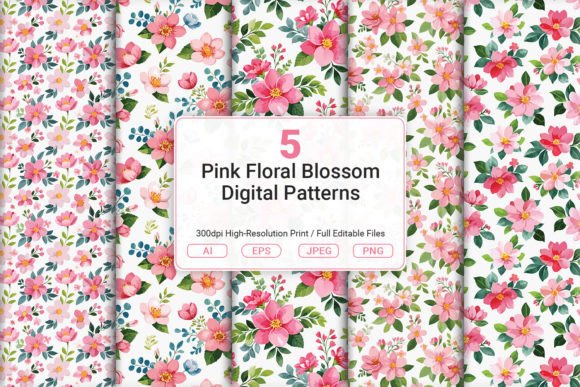
Pink Floral Blossom Digital Patterns: A Guide to Avoiding Common Design Pitfalls
Adding a touch of spring to your designs is easier than ever, but choosing the right digital assets requires more than just finding an image that looks pretty. Pink Floral Blossom Digital Patterns have become a staple for creators looking to inject freshness and elegance into their projects. Whether you are crafting personalized invitations, designing stationery, or creating home decor items, these high-resolution patterns offer a versatile foundation. However, many users jump straight into editing without checking critical file details, which can lead to disappointing results in print or on screen.
To truly let your creativity bloom, it is essential to understand not just how beautiful these patterns are, but also how to utilize them effectively. The difference between a professional-looking final product and a pixelated mess often comes down to the technical specifications of the files you download. By understanding the nuances of vector versus raster formats and ensuring you have the correct resolution, you can avoid costly mistakes and ensure your work stands out.
Understanding the Value of High-Resolution Assets
When searching for Pink Floral Blossom Digital Patterns, the allure of a cute design is strong, but the resolution is what matters most. Many beginners make the mistake of assuming all "digital" images are suitable for large-scale printing. If you plan to use these patterns for fabric print on demand products, gift wrapping, or wall art, low-resolution files will result in blurry edges and loss of detail when scaled up.
The package described here includes JPG and PNG files at 3600 x 3600 pixels, which equates to 12 x 12 inches at 300 DPI. This is the industry standard for high-quality printing. Without this specific resolution, your greeting cards or notebook covers might look sharp on a computer monitor but appear grainy when printed. Always verify that the file size matches your intended output before purchasing or downloading.
The Critical Role of Vector Files
One of the most significant advantages of this specific collection is the inclusion of AI Illustrator files and EPS files. These are vector-based formats, meaning they are built on mathematical equations rather than pixels. This distinction is vital for anyone who needs to scale their designs beyond the original dimensions.
A common error occurs when users rely solely on JPG or PNG files for logos or large banners. Once you enlarge a pixel-based image, it becomes blocky and unusable. With the open-source AI and EPS files included in this set, you can resize your floral motifs from a tiny icon on a planner cover to a massive backdrop for a wedding invitation without losing any quality. This flexibility is what separates amateur attempts from professional-grade deliverables.
Navigating File Formats for Specific Projects
Different projects demand different file types. While Pink Floral Blossom Digital Patterns provide a comprehensive suite of options, using the wrong format can hinder your workflow or compromise the final aesthetic. Understanding when to use which file type ensures efficiency and preserves the integrity of your design.
- For Fabric and Large Prints: Use the Eps or Ai files. These allow you to cut the pattern to fit any yardage of fabric seamlessly without visible seams or pixelation.
- For Quick Mockups and Web Graphics: The JPG and PNG versions are ideal. They are ready to drop into Photoshop or Canva immediately. The PNG version is particularly useful if you need transparency, though seamless patterns typically tile better with JPGs.
- For Stationery and Planners: Both vector and raster options work well here. If you need to edit the color of the petals to match a brand palette, the vector Ai file is your best choice. If you just need to place the image as-is, the high-res JPG saves time.
Misidentifying the file type can lead to wasted hours trying to fix issues that could have been avoided. For instance, trying to recolor a complex floral element in a JPG file is nearly impossible without destroying the image quality. Always start with the vector source if you intend to modify the design.
Avoiding Overlooked Details in Digital Downloads
Even with a great set of files, there are subtle pitfalls that can affect your satisfaction. One frequent misunderstanding involves the concept of "seamless tiling." Not all floral patterns tile perfectly. Before applying these patterns to a background wallpaper or a full-page journal cover, test the tile by repeating the image four times. If you see obvious lines or gaps where the image repeats, you may need to adjust the alignment in your design software.
Another common oversight is ignoring the color profile. Printers often expect CMYK color profiles, while screens use RGB. If you convert a vibrant pink blossom pattern directly from an RGB JPG to a printer's CMYK space without adjustment, the colors may shift to a duller, muddy tone. Always check your software's color settings before sending files to a print shop to ensure the pink hues remain vibrant and true to life.
Maximizing Versatility in Your Workflow
The beauty of these assets lies in their versatility, but utilizing them across multiple platforms requires a strategic approach. For example, if you are a small business owner selling handmade notebooks, you might want to use the same pattern for both the physical cover and the digital marketing images. To maintain consistency, always export your master vector file into the required formats (JPG for web, PDF for print) rather than creating separate versions from scratch.
This approach not only saves time but also ensures brand consistency. When customers see the exact same floral motif on your website, your packaging, and your social media posts, it builds trust and recognition. Relying on different variations of the flower for different mediums can make your brand look disjointed.
Practical Steps for a Flawless Result
To get the most out of your Pink Floral Blossom Digital Patterns, follow a simple checklist before starting your project. First, confirm that your design software supports the file extensions provided (Adobe Illustrator for .Ai/.Eps, Photoshop or similar for .Jpg/.Png). Second, verify the resolution meets your print requirements; if you are printing on a large canvas, ensure the 3600 x 3600 pixel limit is sufficient for your dimensions. Finally, create a backup of the original files before making any edits.
By taking these precautions, you protect yourself from accidental data loss and ensure that your creative vision is executed precisely. Whether you are designing a romantic invitation suite or a modern wall art piece, the quality of your final output depends on the preparation you put in beforehand. Don't let technical limitations hold back your artistic potential. With the right files and a clear understanding of how to use them, you can create stunning, professional designs that capture the essence of spring every day.
Remember, the goal is to enhance your projects, not complicate them. By selecting high-quality, editable assets like these and respecting the technical requirements of print and digital media, you set yourself up for success. Let your creativity bloom with confidence, knowing that your tools are reliable and your process is sound.